The code pages that are specified for the host to use are detected as part of the initial exchange between StarSQL and DB2. You can determine the CCSIDs that the host is returning to StarSQL by connecting to DB2 using a StarSQL data source from a Windows computer. Use the StarSQL Data Source Configuration Wizard, as described in the following steps, to see the CCSID values the host is returning to StarSQL.
From the System DSN tab, select a StarSQL data source that connects to the host computer for which you want to determine the CCSIDs being used and click Configure.
Select User ID/Password in the left pane of the StarSQL Data Source Wizard. In the right pane, enter a valid password and user ID for connecting to the host and click the Summary button.
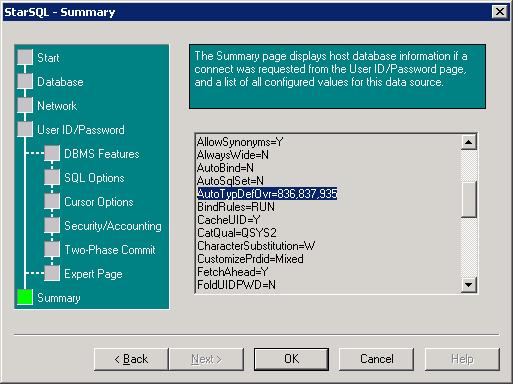
Scroll the summary page as necessary to see the values that appear for the AutoTypDefOvr setting.
The AutoTypDefOvr setting is three comma-separated values of the CCSID for SBCS, DBCS, and MBCS, respectively. For example, the AutoTypDefOvr value that the DB2 for i host returned to StarSQL after connecting with the DSN illustrated below is CCSID 836 (SBCS), 837 (DBCS) and 935 (MBCS).
No value is returned for AutoTypDefOvr is the host's values match the StarSQL default of 37,0,0.