

Stelo Technical Documents
Exporting and sending logs for SQDR (new web interface)
Last Update: 2026/01/05
Product: StarQuest Data Replicator
Version: v6.60 and later
Article ID: SQV00DR056
Abstract
Users have the ability to view the logs for SQDR (Stelo Data Replicator) for monitoring events that are happening during replication. This document outlines how to export / send SQDR logs.
Solution
Exporting SQDR logs
- Open the web Data Replicator Manager.
- Once logged in, select Logs.
- Select the Export button as shown below. This will gather the SQDR logs and download them onto your workstation.

Sending SQDR logs via FTP
- Open the web Data Replicator Manager and log in if you haven't logged in already.
- Once logged in, select Logs.
- Select the Send button as shown below.

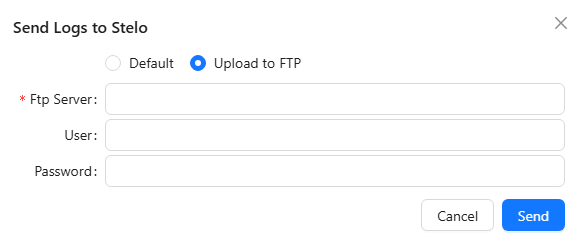
- A dialogue will appear asking if logs should be sent to Stelo (default) or to a different FTP location. Select Default and then Send to send the logs to the Stelo Support Team.

- If the user wants to send the logs to another location, select Upload to FTP, then fill in all of the details for the FTP server and user credentials. Once the following information has been filled in, select Send.
DISCLAIMER
The information in technical documents comes without any warranty or applicability for a specific purpose. The author(s) or distributor(s) will not accept responsibility for any damage incurred directly or indirectly through use of the information contained in these documents. The instructions may need to be modified to be appropriate for the hardware and software that has been installed and configured within a particular organization. The information in technical documents should be considered only as an example and may include information from various sources, including IBM, Microsoft, and other organizations.